

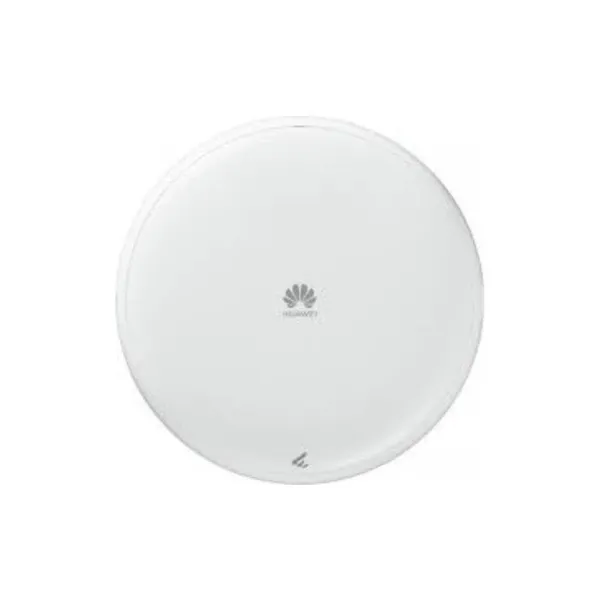

Overview
Table 4-6 Basic information about the AP673
| Item | Details |
|---|---|
| Description | AP673(11be indoor,2+2+4 tri bands,smart antenna,USB) |
| Part Number | 50087291 |
| Model | AP673 |
| First supported version | V600R024C00 |
Appearance

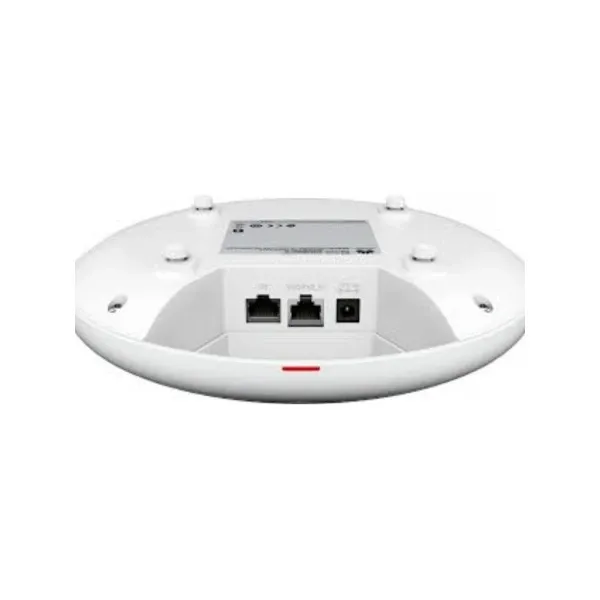
Ports

1 | GE | 2 | 5GE/PoE_IN |
3 | DC 12V | 4 | Security slot |
5 | USB | – | – |
Table 4-7 Ports on the AP673
| Port | Connector Type | Description | Available Components |
|---|---|---|---|
| 5GE/PoE_IN | RJ45 | Ethernet electrical port that supports 100M/1000M/2.5G/5G auto-sensing, connects to the wired Ethernet, and supports PoE input. | Network cable |
| GE | RJ45 | Ethernet electrical port that supports 10M/100M/1000M auto-sensing and connects to the wired Ethernet. | Network cable |
| DC 12V | DC connector | Connects to a 12 V power adapter. | 12 V power adapter |
| USB | USB Type A | Provides 2.5 W or 5 W power supply. | – |
Indicators and Buttons

The indicator is located inside the panel, which turns on after the AP is powered on.
1 | Indicator | 2 | Default |
Table 4-8 Indicators on the AP673
| Silkscreen | Name | Color | Status | Description |
|---|---|---|---|---|
| – | System indicator | – | Off | The system is not running. |
| Green | Steady on |
| ||
| Green | Slow blinking (0.5 Hz) | The AP is running properly, the Ethernet connection is normal, and STAs are associated with the AP. | ||
| Green | Slow blinking (0.2 Hz) | The AP is running properly, the Ethernet connection is normal, and no STA is associated with the AP. | ||
| Green | Blinking once every 0.25s (4 Hz) |
| ||
| Yellow (blinking red and green at the same time, causing color deviation) | Blinking once every 0.25s (4 Hz) | Hold down the Default button for more than 6 seconds to restore the factory settings. This function is supported in V600R024C10. | ||
| Red | Blinking once every 0.25s (4 Hz) | Hold down the Default button for more than 6 seconds to restore the factory settings. This function is supported in V600R25C00 or later. | ||
| Red | Steady on | The system is faulty. |
Table 4-9 Buttons on the AP673
| Silkscreen | Name | Description |
|---|---|---|
| Default | Reset button |
|
Technical Specifications
Table 4-10 Technical specifications of the AP673
| Item | Specification |
|---|---|
| Installation Type |
|
| Dimensions without packaging (H x W x D) [mm(in.)] | Diameter x depth: 220 mm x 45 mm (8.66 in. x 1.77 in.) |
| Dimensions with packaging (H x W x D) [mm(in.)] | 72 mm x 260 mm x 255 mm (2.83 in. x 10.24 in. x 10.04 in.) |
| Weight without packaging [kg(lb)] | 0.745 kg (1.64 lb) |
| Weight with packaging [kg(lb)] | 1.230 kg (2.71 lb) |
| Storage | NAND Flash 512 MB |
| Console port | None |
| Maximum power consumption [W] | 21.1 W (excluding USB) |
| Maximum heat dissipation [BTU/hour] | 66 BTU/hour |
| Power supply mode |
|
| Rated input voltage [V] | 12 V |
| Input voltage range [V] | DC: 12 V ± 10% PoE: 802.3at/af |
| Service port surge protection | PoE port: Differential mode (48 V-RTN): 0.5 kV (1.2/50 us, 42 ohms), criterion B Common mode (8 wires to ground): 4 kV (1.2/50 us, 42 ohms), criterion B |
| PoE OUT | Not supported |
| Maximum number of physical ports on the entire device | 5GE (RJ45) x 1, 100M/1000M/2500M/5000M auto-sensing GE (RJ45) x 1, 10M/100M/1000M auto-sensing |
| Long-term operating temperature [°C(°F)] | –10°C to +50°C (14°F to 122°F) (From 1800 m to 5000 m [5905.51 ft. to 16404.20 ft.], the maximum ambient temperature decreases by 1°C [1.8°F] for every 300 m [984.25 ft.] increase in altitude.) |
| Storage temperature [°C(°F)] | –40°C to +70°C (–40°F to +158°F) |
| Long-term operating relative humidity [RH] | 5% RH to 95% RH (non-condensing) |
| Long-term operating altitude [m(ft.)] | –60 m to +5000 m (–196.85 ft to +16404.20 ft) |
| Atmospheric pressure [kPa] | 53kPa – 106kPa ETSI 300 019-2-3 |
| Ground | Floating ground |
| USB | Supplies power of 2.5 W or 5 W. |
| IoT slot | Not supported |
| BLE | Not supported |
| Radio number | 3 |
| Operating frequency band |
|
| MIMO spatial streams | Radio 0 (2.4 GHz): 2×2 Radio 1 (5 GHz): 2×2 Radio 2 (6 GHz): 4×4 |
| Wi-Fi standard | 2.4 GHz: 802.11b/g/n/ax/be 5 GHz: 802.11a/n/ac/ac Wave 2/ax/be 6 GHz: 802.11a/ax/be |
| Radio interface | Built-in smart antennas |
| Antenna gain | 2.4 GHz: 4 dBi/chain (peak gain) 2 dBi (combined gain) 5 GHz: 5 dBi/chain (peak gain) 3 dBi (combined gain) 6 GHz: 5 dBi/chain (peak gain) 3 dBi (combined gain) |
| Maximum transmit power | 2.4 GHz: 20 dBm/chain 23 dBm (combined power) 5 GHz (2×2): 20 dBm/chain 23 dBm (combined power) 6 GHz (4×4): 20 dBm/chain 26 dBm (combined power) |
| Singal radio transmit power [dBm] | 2.4 GHz: –10 dBm to +20 dBm/chain 5 GHz: –10 dBm to +20 dBm/chain 6 GHz: –10 dBm to +20 dBm/chain |
| MTBF [year] | 110.878 year |
| MTTR [hour] | 2 hour |
| Frequency stability [ppm] | +/-20 |
| 802.3bt power supply description | When the power supply mode is negotiated to 802.3at: When the USB port is not in use or the USB port works at the 2.5 W output power, no function is restricted. When the USB port works at the 5 W output power, the maximum transmit power of radios 0, 1, and 2 all decreases by 3 dB and other functions are not restricted. |
| 802.3at power supply description | When the power supply mode is negotiated to 802.3at: When the USB port is not in use or the USB port works at the 2.5 W output power, no function is restricted. When the USB port works at the 5 W output power, the maximum transmit power of radios 0, 1, and 2 all decreases by 3 dB and other functions are not restricted. |
| 802.3af power supply description | When the power supply mode is negotiated to 802.3af: Wi-Fi service: A maximum of 2.4 GHz (2×2) + 5 GHz (2×2) is supported. The USB power supply is unavailable, and other functions are not restricted. |
| DC power supply description | No function is limited. |




Reviews
There are no reviews yet.